ThoughtBeam — by Synapsis Medical

Journal at the
speed of thought.

Sixty seconds, one honest sentence. ThoughtBeam turns the notes you actually write into patterns you can see — without streaks to protect or a blank page to dread.

Download ThoughtBeam on the App StoreGet ThoughtBeam on Google Play
Entries stay
On your device
Time to write
60 seconds
Runs on
iOS & Android
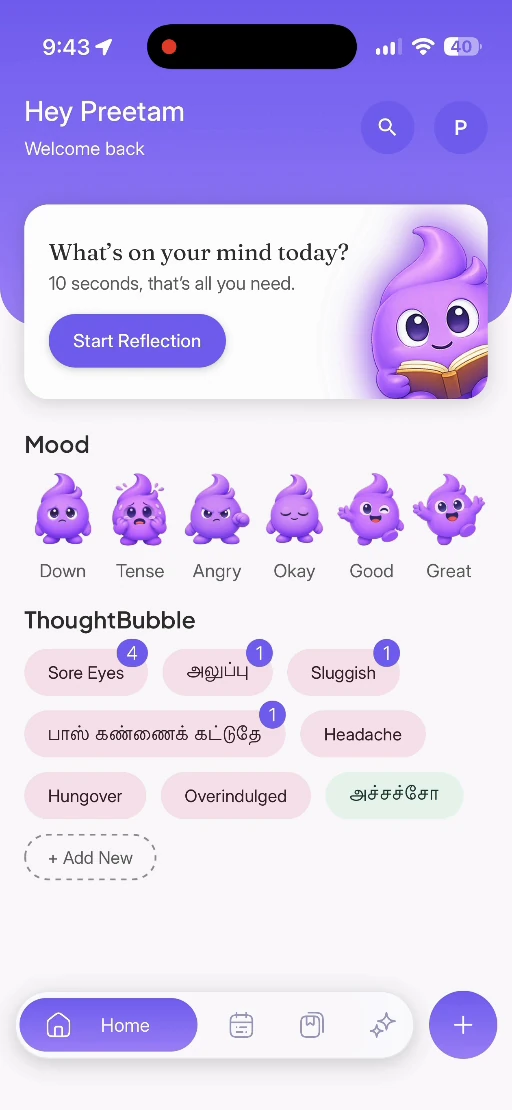
The ThoughtBeam home screen showing the mood picker and recent entries

What you get

Why you’ll actually journal this time

Most journaling apps fail because they ask for more than you have on a bad day. This one asks for a sentence.

  • 01

    Open, tap, type

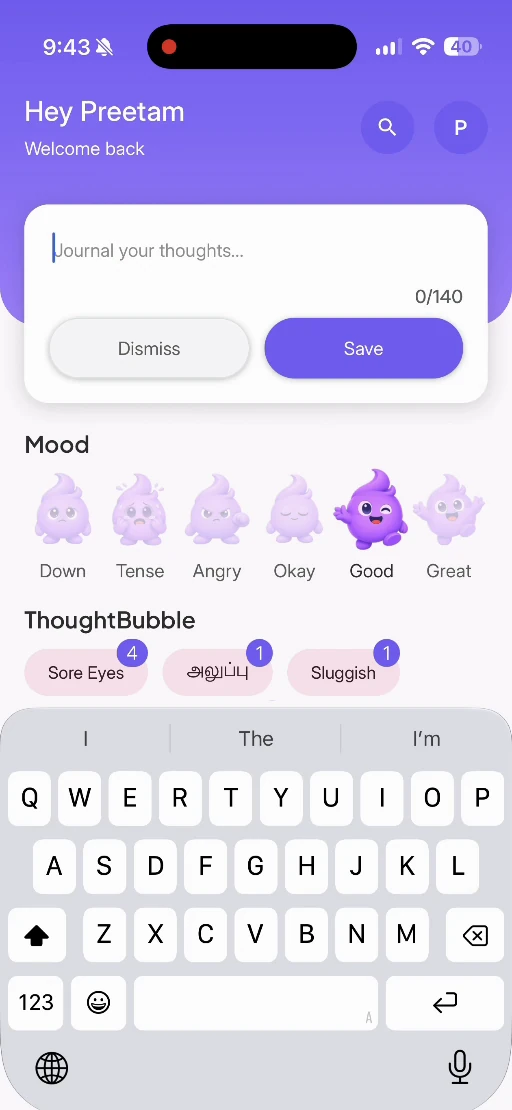
    A cursor and a gentle nudge. No blank page staring back, no setup ritual before you can write the thing you came to write.

  • 02

    Mood in a moment

    Six moods, one tap. Over weeks those taps become a shape you can read — the days that run light, the ones that do not.

  • 03

    ThoughtBubbles

    Drop half-formed thoughts into 50+ bubbles, or make your own. Loose fragments collect themselves into something you can revisit.

  • 04

    Guided or free-flow

    CBT-inspired prompts when you want a question to answer. An empty page when you would rather not be asked anything.

  • 05

    Voice and photo notes

    Too much to type, record it. Worth remembering exactly as it looked, photograph it. Both land in the same entry.

  • 06

    Gentle insights

    Small trends, never diagnoses. Which days feel lighter, which habits show up alongside them, where you are quietly winning.

Also includedSmart bookmarksPrivate by defaultiOS and Android

The loop

Four steps, about a minute

Short enough that you will still do it on the days you do not want to.

  1. 1

    Set your vibe

    Tap the emoji that matches how you feel. There is no wrong answer and nothing to overthink.

  2. 2

    Capture the sparks

    Type a line, record a voice note, or toss a thought into a bubble. Seconds, not minutes.

  3. 3

    Reflect your way

    Free-write, or take a guided prompt that asks the next question you were circling anyway.

  4. 4

    See tiny wins

    ThoughtBeam surfaces the small patterns worth noticing, which is usually what keeps people going.

Premium — in development

CBT-style brainstorm

When a thought is tangled, ThoughtBeam asks a few short, kind follow-ups to work out what is actually going on — then suggests one small thing you could do about it today.

Inside the app

Ten screens, no clutter

Every screen does one job. Nothing asks you to configure it first.

01 / 10
  • ThoughtBeam Home screen — Your whole day, one screen

    Home

    Your whole day, one screen

    Mood, thought bubbles and a ten-second prompt, waiting the moment you open it.

  • ThoughtBeam Thought bubbles screen — Tag how it actually felt

    Thought bubbles

    Tag how it actually felt

    Restless, well-rested, sore eyes. Tap the ones that fit and ignore the rest.

  • ThoughtBeam Write screen — A hundred and forty characters

    Write

    A hundred and forty characters

    Long enough to be honest, short enough that you actually finish it.

  • ThoughtBeam Photo journal screen — Anchor it to what you saw

    Photo journal

    Anchor it to what you saw

    Attach a few photos so the entry still means something a year from now.

  • ThoughtBeam Guided reflection screen — For the days you are stuck

    Guided reflection

    For the days you are stuck

    Work stress, relationships, self-doubt, loneliness. Pick one and answer.

  • ThoughtBeam ThoughtBundle screen — One day, bundled together

    ThoughtBundle

    One day, bundled together

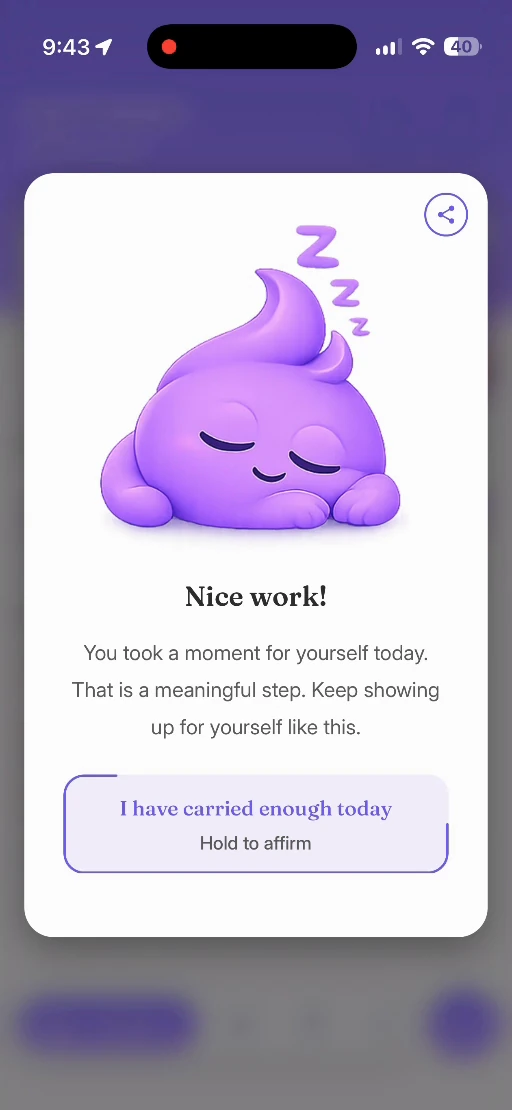
    Words, photos, mood and tags kept in a single card you can share.

  • ThoughtBeam Calendar screen — See the month at a glance

    Calendar

    See the month at a glance

    Which days you wrote on, without a streak counter guilting you into it.

  • ThoughtBeam Saved screen — Keep what is worth rereading

    Saved

    Keep what is worth rereading

    Bookmark the entries you will want to come back to and find them instantly.

  • ThoughtBeam Search screen — Ask your journal a question

    Search

    Ask your journal a question

    "How do I usually feel?" — answered from what you already wrote.

  • ThoughtBeam Profile screen — Yours to control

    Profile

    Yours to control

    Notifications, privacy and your account, all in the same place.

Questions

Everything people ask

  • What is ThoughtBeam?Getting Started

    ThoughtBeam is a mental health journaling app designed to help users track their moods, log thoughts and symptoms, and maintain daily journal entries. It uses intuitive interfaces with mood emojis and thought bubbles to make mental health tracking simple and accessible.

  • How do I create an account?Getting Started

    ThoughtBeam uses Firebase authentication. You'll go through the onboarding process first, then create an account using email/password signup on the authentication screens.

  • Is ThoughtBeam free to use?Getting Started

    ThoughtBeam appears to be a free app focused on mental health and wellness tracking, though I'd recommend checking the app store listing or terms of service for any premium features.

  • How does mood selection work?Core Features · Mood Tracking

    Tap any of the 6 mood emojis (Cranky, Stressed, Down, Wiped, Serene, Joyful) on the home screen. The selection will be automatically saved and highlighted. Each mood selection lasts for 10 seconds before auto-deselecting.

  • Why does my mood selection disappear?Core Features · Mood Tracking

    Mood selections are designed to be temporary - they automatically deselect after 10 seconds to encourage real-time mood tracking throughout the day rather than setting a permanent mood.

  • Can I have multiple moods selected?Core Features · Mood Tracking

    No, you can only select one mood at a time. Selecting a new mood will deselect the previous one.

  • What are thought bubbles?Core Features · Thought Bubbles (Symptoms & Thoughts)

    Thought bubbles are tags representing physical symptoms, emotional states, or life situations like "Headache", "Anxious", "Work Pressure", "Feeling Healthy", etc. You can log these throughout the day to track patterns.

  • How do I log a thought?Core Features · Thought Bubbles (Symptoms & Thoughts)

    Simply tap on any thought bubble on the home screen. Each tap increments a counter, so tapping "Headache" three times means you experienced 3 headaches that day.

  • What are the numbers on thought bubbles?Core Features · Thought Bubbles (Symptoms & Thoughts)

    The numbers show how many times you've logged that thought today. They're cumulative counters that reset daily at midnight.

  • How do I remove a logged thought?Core Features · Thought Bubbles (Symptoms & Thoughts)

    Long-press on a thought bubble that has a count. This will remove one instance of that thought from your daily log.

  • Why do some thoughts appear more prominently?Core Features · Thought Bubbles (Symptoms & Thoughts)

    The app shows the 15 most frequently used thoughts based on your recent logging patterns, making common thoughts easier to access.

  • How do I start writing a journal entry?Core Features · Journaling

    On the home screen, tap the blue "Start Journaling..." button in the floating card. This opens a text input where you can write freely.

  • What happens to my journal entries?Core Features · Journaling

    Journal entries are automatically saved throughout the day using AsyncStorage (local storage). At midnight, they're permanently saved to your cloud account via Firebase.

  • Can I edit or delete journal entries?Core Features · Journaling

    You can dismiss an entry by tapping "Dismiss" (it won't be saved), or save it by tapping "Save". Once saved, entries appear in your journal history where they can be viewed but not edited through the main interface.

  • What if the app closes while I'm journaling?Core Features · Journaling

    The app automatically saves your journal text every 500ms while typing, so you won't lose work even if the app crashes or closes unexpectedly.

  • How do I add photos to my journal?Media Features

    Use the photo journaling feature to take pictures or select from your photo library. The app requests camera and photo library permissions on first use.

  • What about voice journaling?Media Features

    The app includes voice journaling capabilities using the device's microphone to record audio notes and reflections.

  • Why does the app request camera/microphone access?Media Features

    These permissions enable photo and voice journaling features respectively. Photo access allows you to add images to journal entries, while microphone access enables voice recordings.

  • What are thought bundles?Organization Features · Thought Bundles

    Thought bundles appear to be collections or categories of related thoughts that you can create and manage.

  • What are bookmarks?Organization Features · Bookmarks

    Bookmarks allow you to save and easily access important or frequently referenced journal entries.

  • Where is my data stored?Data & Privacy

    Journal entries and thought logs are stored locally during the day (AsyncStorage) and synced to Firebase at midnight. All data is stored securely using Firebase's cloud infrastructure.

  • Is my data private?Data & Privacy

    Yes, ThoughtBeam follows privacy best practices. Your data is encrypted and only accessible to you through your authenticated account.

  • Can I export my data?Data & Privacy

    The app doesn't show built-in export features in the current interface, but you may be able to access your data through your account settings.

  • What happens to my data if I delete my account?Data & Privacy

    Check the delete profile screen - it should explain the data deletion process when you choose to remove your account.

  • Does ThoughtBeam send notifications?Notifications & Reminders

    Yes, the app includes notification functionality, likely for daily journaling reminders or mood check-ins.

  • How do I manage notification settings?Notifications & Reminders

    Notification preferences can typically be managed through your device's system settings for the ThoughtBeam app.

  • Does ThoughtBeam work offline?Technical Questions

    Partially yes - you can log thoughts and write journal entries offline (saved locally), but syncing to the cloud requires internet connectivity.

  • Can I use ThoughtBeam on multiple devices?Technical Questions

    Yes, since data is stored in Firebase, you can access your journal across multiple devices where you're signed into your account.

  • What platforms does ThoughtBeam support?Technical Questions

    ThoughtBeam is built with React Native and Expo, supporting both iOS and Android devices, as well as potentially web platforms.

  • How do I update the app?Technical Questions

    Updates are handled through the App Store (iOS) or Google Play Store (Android) where you originally downloaded the app.

  • My thoughts aren't saving!Troubleshooting

    Check your internet connection for cloud syncing. Local saves should work offline. If the issue persists, try restarting the app.

  • The app is slow or freezingTroubleshooting

    This could be due to large amounts of local data. Try clearing cache through your device settings, or restart the app.

  • I lost a journal entryTroubleshooting

    Check your journal history. If it was saved before midnight, it should be in your cloud storage. Entries dismissed (not saved) cannot be recovered.

  • I'm not receiving notificationsTroubleshooting

    Ensure notifications are enabled for ThoughtBeam in your device settings, and check if you have "Do Not Disturb" or similar modes active.

  • The app won't openTroubleshooting

    Try force-closing the app through your device's app switcher, then reopen. If that doesn't work, restart your device or reinstall the app.

  • Where can I get help?Support & Help

    The app includes a Help & Support screen accessible from your profile. You can also contact support through the app's support channels.

  • How do I provide feedback?Support & Help

    Feedback options should be available through the app's settings or help section.

  • Can I switch accounts?Support & Help

    Yes, you can log out through your profile and sign in with a different account, though this won't transfer your existing data.

Get started

Write one sentence tonight

Free to download, private by default, and it takes less time than deciding what to watch.

Download ThoughtBeam on the App StoreGet ThoughtBeam on Google Play
  • It feels like a kind friend who remembers the things I forget about myself.

    Maya R.Journaling for 7 months

  • I finally journal daily. The bubbles are genius — I can dump a thought without finishing it.

    Amir H.Journaling for 4 months

Occasional updates

New features and the odd journaling idea. No more than monthly.